Comments
I use an embarrassingly wide set of “productivity” tools. Here are some of them, and a few practices that go with them: not the tools that directly help me learn and understand the world and communicate my ideas, but instead the tools that steer my attention and overcome my psychological obstacles. This system - to the limited extent that it is a coherent system - has grown by accretion over the last 10 years or so, with one perceived need giving rise to an extra layer or embellishment until the whole thing has become a baroque Rube Goldberg machine.
Self control
Boss as a Service
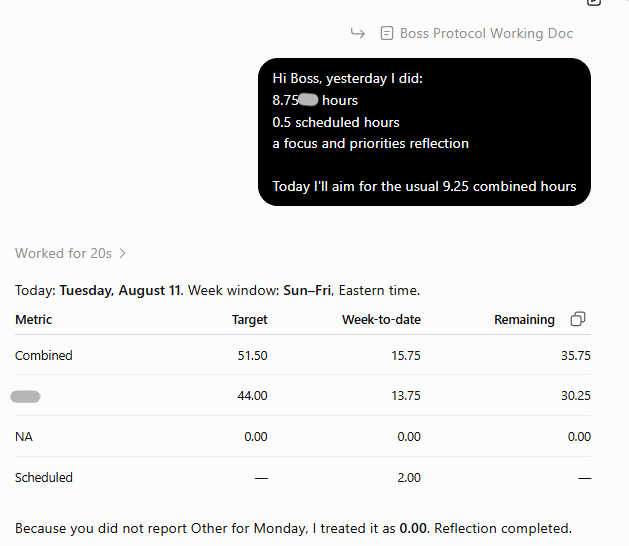
For a monthly fee, Boss as a Service provides a human “boss” based in India who asks you to set goals, checks in with you daily via email or WhatsApp, and generally holds you to account. They also ask you for proof that you have done what you said you did, though I didn’t want that, and my boss skipped that part. I used Boss as a Service for several years. Last year, I switched to an ongoing chat in ChatGPT that follows a how-to document essentially recreating the parts of BaaS I wanted. The ChatGPT version has the advantages of being able to read my Google Calendar and respond immediately, though I really like the BaaS company and vision. My hope is that they will create their own AI-powered version that works even better.
I started using Boss as a Service when I was between jobs and I was having trouble forcing myself to spend even a few hours per day working on job searching and applications, which I loathed. It helped enough that I continued subscribing after I got another (work-from-home) job.
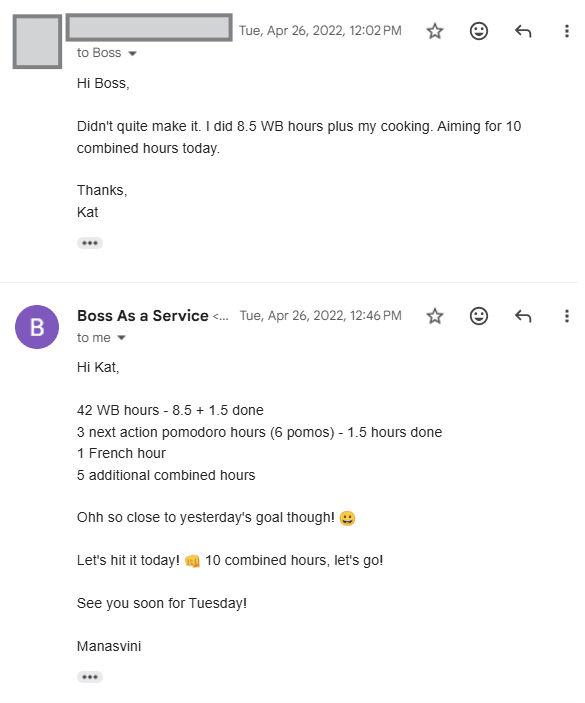
Every morning the first thing I do at my computer is write to my “boss” about how I did against my goals from the previous workday and what goals I am setting for today. Every Sunday morning, when I plan out my week, I review the past week and set goals for the next one. 95% of the time, my BaaS goals are exclusively about time use, rather than about specific achievements or deliverables.[1] However, sometimes there’s a particularly aversive task or an important objective, and treating that as a key criterion of a successful day by including it in my BaaS goals helps me focus on it. My goals for the week usually specify targets for:
- Hours spent working at my job
- Hours spent doing my personal next actions (see below)
Total combined hours, which include the two categories above plus what I call “Scheduled hours”: hours spent on activities that are scheduled on my calendar.[2]
Throughout the week, I typically set daily goals for “combined hours”, though if I’ve hit my goal for next action hours or am running short of total available time to hit my job hours target, I set specific goals for job hours and/or for NA hours. My boss sends me a report each day tallying up the cumulative weekly progress I’ve reported, so I can adjust and course correct as need be. In particular, it mentions each day if, taking into account everything on my calendar, I’m still on track to hit my goals, including how much buffer (or deficit) I have.
 |  |
Toggl Track
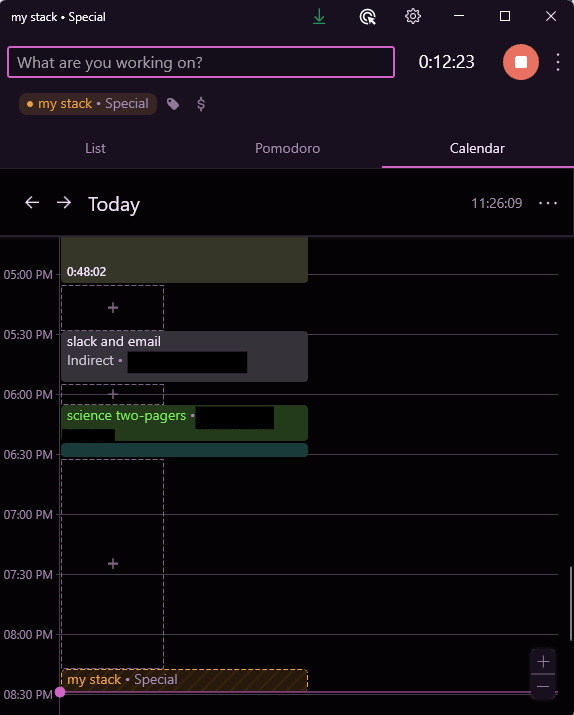
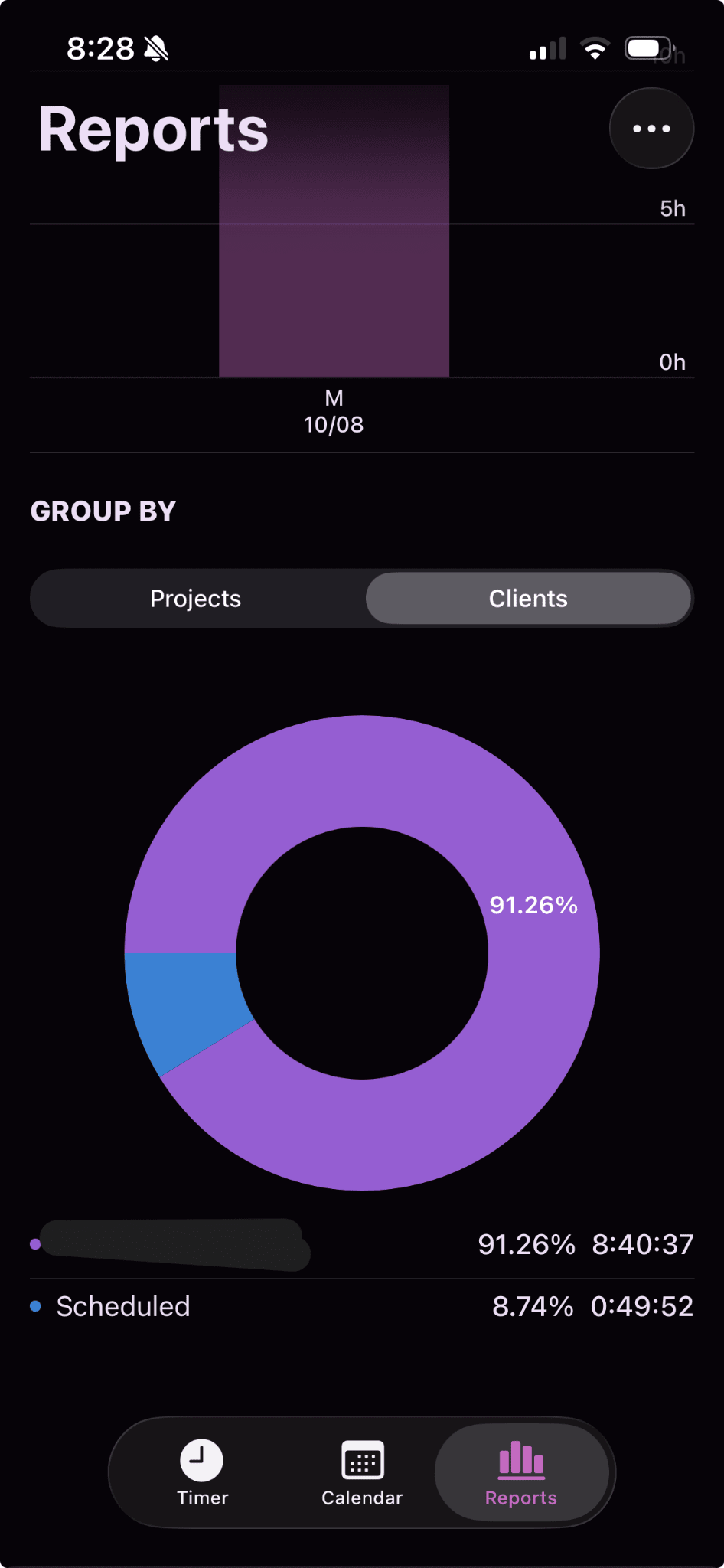
In order to set time use goals, I need to log my time use. I use Toggl Track. I can’t remember why I chose it over competitors in the first place--perhaps because it was and is free for all the features I need. This is to say, I don’t know if the several big competitor products are better. But Toggl Track has been good enough for me for years. In particular:
- It runs on both my laptop and my phone.
- It allows me to assign time entries into a hierarchy of categories (client, project, description). Each of the time use categories described above--Job, Scheduled, Next Actions--is a “client” in Toggl. That lets me see my results each day at a glance when I write to my “boss”, while also letting me dig deeper into the breakdown of Job time into different projects.
For a year or two, I tracked everything I did on Toggl, thinking it would be a good source of data for self-learning. To get other time series about myself to analyze with the time tracking data, ran a daily survey for myself for a long time and experimented with an arcane self-polling tool called TagTime. But I almost never actually did analyze the data, but the one or two times I tried, I didn’t learn anything useful. Instead, I focus on accurately tracking the things that feed into my BaaS or Beeminder goals, and I’m haphazard at best with everything else.
On the computer, I have Toggl configured so that Alt-T immediately calls it up and, with a few other keyboard shortcuts long burned into muscle memory, I can stop, start, or modify a time entry.
|  |
Beeminder
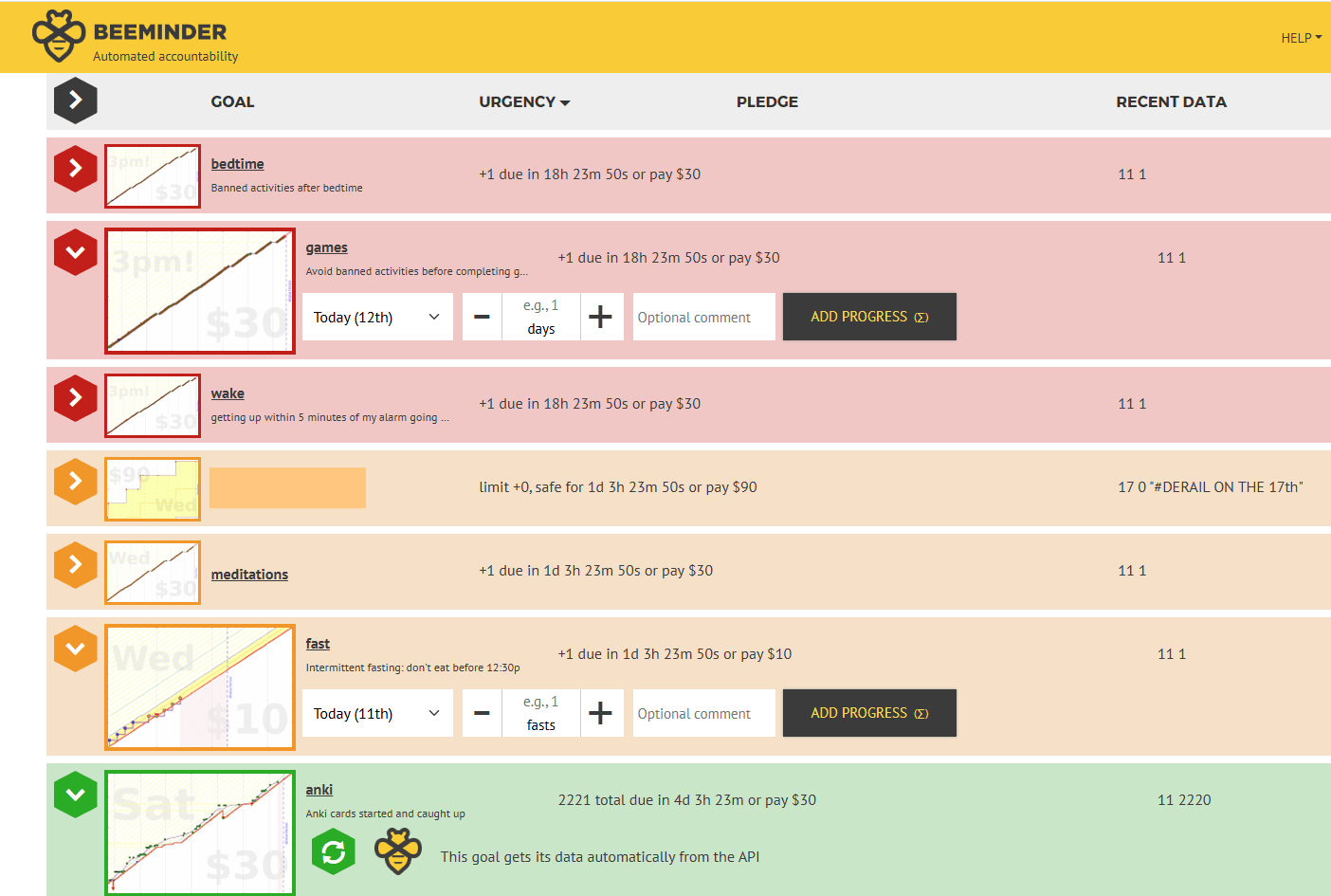
To get myself to change routine behaviors, especially when simply setting intentions proves insufficient, I use Beeminder. It’s a website where you set quantitative progress goals (e.g., write at least X words per week), and if you fall behind, it charges you money. (Yes, the money goes to the company. It’s a brilliant business model) In Beeminder, for every “goal,” there’s always a deadline. As you get close to it, the website makes a big fuss, sending you whatever notifications you’ve signed up for, with increasing frequency, up until the point that you “derail.”
The first thing I Beeminded was the number of (short) workouts I did per week, and it was the first time in my adult life I stuck to an exercise routine. For knowledge work, my most relevant goals are:
- Every day, avoiding blacklisted “reward” activities like reading fiction or playing games until after I have hit my goal for the day (see Boss as a Service, above).
- Adding several Anki cards each week while not falling behind on reviews, using this clever Anki/Beeminder integration.
- Spending at least a target number of hours each week studying whatever I want, using the built-in Toggl Track integration.
- Every day, avoiding blacklisted energizing activities after my bedtime.
For most of my Beeminder goals, I self-report my progress, either right when I do it (exercise) or the next day (avoiding blacklisted post-bedtime activities, since I don’t want to be on my phone entering Beeminder data after bedtime). People always ask me how it still works if I can just cheat. I’ve never cheated in spite of spending thousands of dollars in penalties, because it’s not in my interest. I know that if I cheat once, the tool will become much less valuable, because I can no longer trust myself not to cheat in the future. So, when I am faced with a choice of:
- self-reporting accurately and paying a $30 penalty or,
- submitting false data and losing this highly valuable tool,
then (2) is obviously the right choice.
Project and task management (Notion and Todoist)
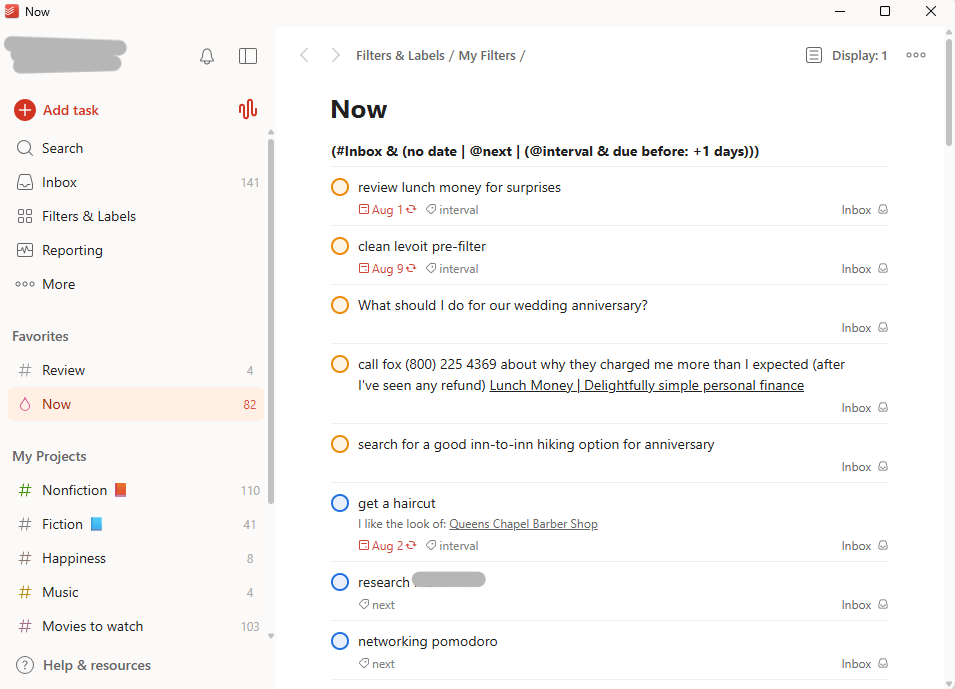
To keep track of things and orchestrate my work, I keep two parallel versions of essentially the same system for, first, my paid full-time job and, second, everything else (“personal”). The system consists of a “projects” list, for things that take more than one sitting to do, and “tasks”, which can be done in a single sitting. This system is based on Getting Things Done by David Allen.[3] The task list is what I use to decide what to do next when I have unscheduled time; it’s what David Allen calls a Next Actions list. The projects list is a tool I use to zoom out periodically, see the bigger picture, and reconsider my broader priorities. In terms of software, for these lists I use some customized Notion templates (for my personal project list, job project list, and job task list) and Todoist (personal task list). In the past I’ve also used Asana for an integrated project and task list.[4]
Task list
Items in the tasks list each have a priority rank, 1-4. Tasks can also have a reminder date, which is not the same thing as an objective due date for the task (like the deadline for a conference application). The list is sorted as follows:[5]
- First, all tasks without a reminder date or a priority rank
- Second, tasks whose reminder date has been reached
- Third, all other tasks sorted by priority rank
I don’t always assign a priority rank when adding an item to the list. The most important thing to me is to capture a task when it comes to mind or when I promise I’ll do something. Nonetheless, I do almost always assign priority ranks and/or reminder dates to all tasks in the first tier before doing any tasks on the list; if I started having a stack of unprioritized tasks at the top of the list, the system would quickly decay into an overwhelming to-do list rather than a focusing tool.
I assign priority rankings by hunch, typically spending only a few seconds on each one and taking into account:
- Importance, which drives the priority up
- Urgency, which drives the priority up
- The time required to complete the task, which drives the priority down. The logic behind this one is that if I really have to choose, it can be better do to several lower-importance tasks than one higher-importance task.
The majority of my tasks have a priority ranking but no reminder date. When I assign a reminder date, it’s typically because one of the following reasons:
- There is a date after which the value of doing the task will start declining more sharply, especially when there’s an external deadline. I typically set a reminder date X days before the actual date, where X is greater the more time-consuming and important the task is. If I hit the reminder date, I either just do the task or set a new higher priority ranking with a reminder date Y days before the actual due date, where Y < X, etc. The idea is this: When there is an external deadline, I’m essentially trying to choose a time to do the task that minimizes the opportunity cost of doing it at that time. The cost of doing a task changes over time because it is determined by the delay imposed on other outstanding time-sensitive tasks. With lots of time before the actual deadline, there’s a relatively high probability that I’ll reach a point where there’s a much lower opportunity cost of doing the task than there is currently, and thus the task should be relatively low priority, all else equal. But as the time before the deadline gets shorter, the probability of a future drop in its opportunity cost gets lower, so there’s less reason to try to defer it until after I’ve completed all my outstanding priority 1 (or 2, or 3) tasks.
- As a reminder to do something in the future, when I can’t or shouldn’t do it now. For example, if I want to check back on the results of a decision-relevant study that is still underway. As a general guiding principle, I try to reduce the amount of things I have to remember--my memory is pretty unreliable.
A task can have various other optional properties, including a more detailed description than the title, a “quick link”, or an associated project. One implication: even when tasks are assigned to projects, the list displays tasks from different projects interspersed with each other, not grouped by project. This could be a feature or a bug. It’s a feature because sometimes the importance or urgency of different tasks in Project X varies dramatically, and it can in principle be the right choice to do the most valuable Project X tasks, then pivot to Project Y, and only return to less valuable Project X tasks if time allows. It’s a bug in that it encourages a lot of context switching, which is widely believed to be inefficient. When I think context switching is costly--in other words, when I think a good way to work on a project is to do many of its associated tasks in a row--I track the associated tasks outside of this system, in a “Project Notes” Google Doc (discussed below).
In practice, I’ve found that I often don’t associate tasks with projects. In my personal system, it is not even possible to assign tasks to projects. Instead, for projects where I’m using a Project Notes doc, I often have tasks in the system like “Pomodoro on finding potential plant science funding opportunities.”
Project list
Projects vary dramatically in scope and open-endedness, though they are broadly “bigger than tasks”.[6] One of my personal projects is “Do good,” while another is “Install shelves in my wife’s office.”
I review my list of projects once a week, in principle.[7] I typically have 10-20 active personal projects at a time. For each project, I consider:
Whether to mark it complete or to abandon it[8]
- How it ranks among my other priorities this week (loosely, usually without writing anything down)
- If there are upcoming opportunities to make progress in the coming week to be aware of
- What additional tasks would help complete the project, which I add in the appropriate Google Doc and/or my task list
Since I know I will review my project list regularly, when I think of a longer-term goal, I know I can add it to the projects list and put it aside for now to focus on my current, deliberately selected priorities.
Project Notes docs
A common piece of advice is to break big tasks or projects into smaller pieces.[9] That practice helps me in several situations:
- When I don’t know how to do a big task off the top of my head
- When I have an ugh-field, perhaps because I worry that I will not be able to complete the task well
- When I have lots of ideas of what I could do on a project or task but am not sure what is best to do next
I break big tasks or projects down by adding a section called “Todos” to the Google Doc where I keep my “Project Notes” (I often create “Project Notes” docs even for things that I track as “tasks”). Under Todos, I write bullets that are simple subtasks: things I definitely know how to do or at least get started on. They are things like:
- Copy the effect sizes into my draft from North, Bennardo, and Malki (2010)
- Brainstorm people I know who have worked on this topic
- Ask Claude which scientific discoveries have had the largest effect on welfare in people in LMICs in the last 50 years
- Skim Rothfuss (2007) for ideas
The secret sauce to making this work is the keyboard shortcut Ctrl-Alt-Up/Down, which moves the current bullet up or down one line, swapping it with the adjacent bullet. Once I got the shortcut into muscle memory, it became frictionless to re-sort bullets according to what seems most useful at each stage. Then I can look through the list, see a few things that seem most useful, move them up to the top, and get started on one. When I finish it, I have a suggestion in front of me of what would be best to do next.
The shortcut Alt-Shift-5 for strikethrough also comes in handy to mark bullets as completed.[10] When I start to have so many completed bullets that they get in the way (around 15-20, maybe), I create sub-headings “Hidden” and “Visible”, move the completed bullets under “Hidden”, and collapse the Hidden heading (you can collapse/hide headings if you’re in Pageless view, which I prefer).
A Project Notes doc also contains other sections with thoughts and lists about how to go about a project. Common ones for me are:
- A Subprojects section where I list major components of a complex project as an aid to prioritization and to coming up with ideas for Todos. This is helpful since my Todos aren’t organized into any categories
- A Scratchpad section where I can think “aloud” in a totally unstructured way. I often end up typing up dialogues with myself here.
Other favorite tools (and one practice)
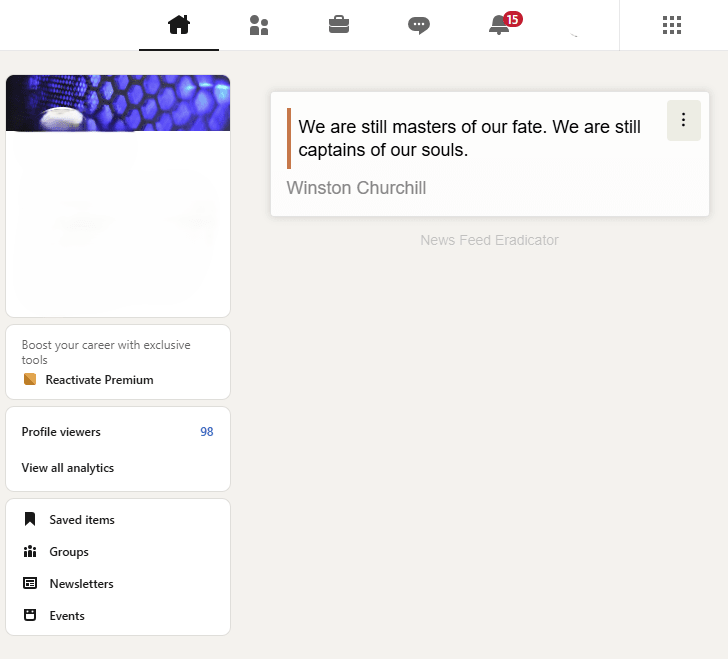
- News Feed Eradicator (Chrome extension): Stops Chrome from displaying the feed on social media websites, while allowing you to use other features like messaging, someone’s page, or a specific linked post. As a result, your attention doesn’t get hijacked and you can use the website for the thing you intended to. A good alternative to blocking Facebook, LinkedIn, or X altogether.
- one sec (iOS and Android app): requires you to stop and wait for a configurable number of seconds when you try to load a blacklisted app. Sometimes I can’t delete an app from my phone (like Gmail), but I still check it compulsively much more than I ought to. One Sec helps with that.
- Leechblock (Chrome extension): A great multi-purpose anti-distraction tool. It can block websites entirely, block them at specific times, require you to pause and wait, interrupt you after you’ve spent X minutes on a specific website, impose a time limit. Highly configurable. I have separate settings for “never allow” sites (e.g.,webcomics that can suck me in) and for “dangerous” sites (Wikipedia, Reddit).
- A custom pomodoro timer (link) I hired someone on Upwork to make for me. Pomodoros are 25-minute sprints interspersed by 5-minute breaks. I had this made because I really wanted one that would automatically do the break, but force me to reset the work alarm so I didn’t start tuning it out. It also sends a push notification to my iPhone and integrates with Beeminder.
The Snooze feature in email clients (Gmail, Outlook web, Front[11]). Now, if there’s any reason I think I’ll (potentially) want to revisit an email thread in the future, whether to follow up or reconsider an option, I can set a date for that to happen automatically.
- Inbox When Ready (Chrome extension) for Gmail. Like News Feed Eradicator but for email. You can use Gmail to search and draft without getting distracted by new messages. When I have to use other email clients, I find ways to re-create this functionality.
- When I’m writing, I often create a document called Deletions where I cut-and-paste text I’m leaning towards dropping or replacing. I used to call this “Darlings,” after Faulner’s writing advice to “kill your darlings.” It helps me feel more free about deleting a passage or trying to rewrite it, because it feels more reversible if I change my mind later.
- ^
This is a simplification. A third common category is new habits, which I sometimes set as default goals for every single day. At the moment the one I’m working on is doing a short nightly written reflection on how well I spent the time when I was working, in terms of focus and prioritization. That is, in the current regime, I haven’t completed my goals unless I’ve done the reflection, even if I didn’t mention it in the morning boss email.
- ^
If I plan to spend 2 hours with a friend but actually spend 3 hours, I only count 2 Scheduled hours.
- ^
I think most of the value of the Getting Things Done book is contained in its incredible workflow diagram, rather than the text.
- ^
The reason I use specific software is totally idiosyncratic to me. I would not recommend using Notion for this unless you are already familiar with Notion or you collaborate with a team of people using it. Asana was good for this the last time I used it (early 2020), but I have no reason to think it is the best. Todoist is an excellent to-do list app, but there’s nothing about it I find particularly good for a project list.
- ^
The sorting and grouping of items in my personal task list is more complicated because of other distinctions I make between some personal tasks and because it also governs when I get reminders of tasks as push notifications. In my job, I get almost all the push notifications I need via Google Calendar. The more complicated sorting and grouping is implemented with a Todoist “filter query”.
- ^
Without double checking, I have the impression that I use projects for some things that are too large to be “projects” according to a strict reading of Getting Things Done.
- ^
In practice, I’m much more consistent about this with my personal stuff, which is more varied. My job system is evolving away from the description here as I tailor it for the specific cadence and needs of my job.
- ^
In my personal system, I also sometimes mark projects as “paused”, and I have a task that recurs every few months to review my paused projects in case I want to reactivate some of them.
- ^
The first source of this advice that comes to mind is - oddly - the novel Mistborn by Brandon Sanderson.
- ^
This may be something I set up as a personal customization; I don’t remember
- ^
Front is an excellent email client for teams. Its killer feature: you can share access to a thread among team members, even if it’s complex with, for example, a mix of one-on-one replies and reply-alls. Everything else in the post is offered as neutral sharing of what I do, recognizing that it might not be right for you. The only earnest recommendation I will make is that if you ever forward email threads within your team to share information, and especially if you collaborate on email drafts, your team should try Front.